
If you own a WordPress site and want to track exactly who is visiting your website in real time, Visitor Traffic Real Time Statistics Pro is one of the most complete solutions available today.
Unlike external platforms, this plugin allows you to view statistics directly inside the WordPress administrative dashboard, offering detailed information about visitors, pages accessed, browsers used, countries of origin, devices, search engines, and much more.
In this guide, you will learn about all the plugin's features, its advantages, differences compared to Google Analytics, and how to purchase this premium plugin at a very affordable price.

What is Visitor Traffic Real Time Statistics Pro?
Visitor Traffic Real Time Statistics Pro is a premium WordPress plugin designed to monitor your website traffic in real time.
After installation, it automatically starts recording various important pieces of information about your visitors, allowing administrators and marketers to track site performance without relying on external platforms.
The plugin was developed to be simple to use, yet extremely powerful in features.

Key Features
Among the main available features are:
-
Real-time statistics
-
Online visitor counter
-
Unique visitors
-
Total visits
-
Page views
-
Visitors' country of origin
-
Visitors' cities
-
Operating system used
-
Browser used
-
Visited pages
-
Various graphical reports
These features help administrators understand exactly how their visitors interact with the site.
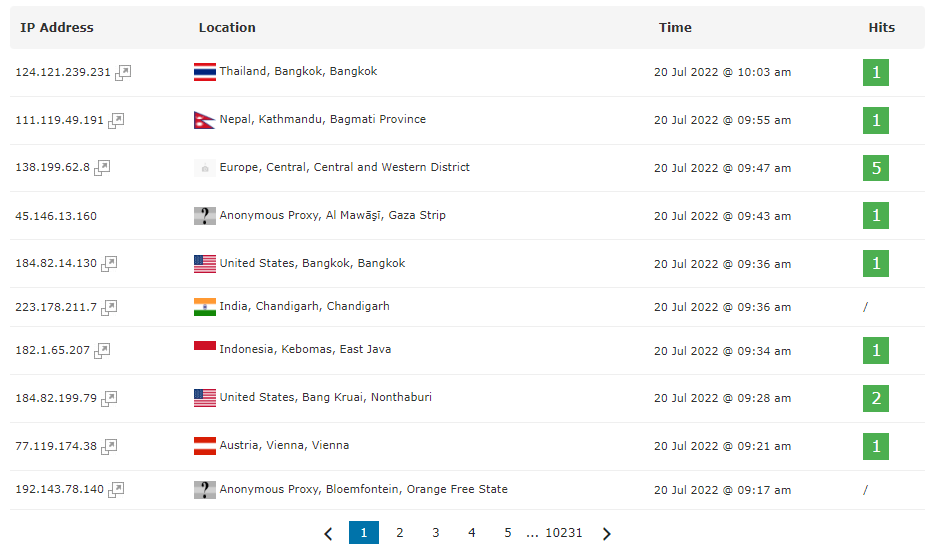
What Information Can the Plugin Show?
After installation, you will be able to view information such as:
-
How many people are online right now;
-
How many visitors accessed the site today;
-
How many pages were viewed;
-
Which browser each visitor uses;
-
Operating system;
-
Access referral (Google, Bing, social networks, or direct access);
-
Most accessed pages;
-
Peak traffic hours;
-
Visitors' IP.
Does the Plugin Make WordPress Slow?
Visitor Traffic Real Time Statistics Pro was developed to work integrated with WordPress, storing statistics directly in the site's database.
When used on quality servers and with properly configured caching, its impact is usually quite reduced. Even so, like any real-time monitoring plugin, it is important to keep WordPress optimized and perform periodic cleanups when necessary.
Does Visitor Traffic Real Time Statistics Pro Work with WooCommerce?
Yes. The plugin can be used normally in WooCommerce stores to track:
-
Online visitors;
-
Most accessed product pages;
-
Origin of visitors;
-
Traffic behavior;
-
General store statistics.
How to Install Visitor Traffic Real Time Statistics Pro
The installation is quite simple.
1. Download the plugin;
2. Access the WordPress administrative dashboard;
3. Click on plugins;
4. Click on add new;
5. Click on upload plugin;
6. Select the zip file;
7. Install;
8. Activate the plugin;
9. Configure the time zone.
Is It Worth Buying Visitor Traffic Real Time?
If you want to track your site's traffic directly in WordPress, without depending exclusively on external tools, the answer is yes.
The Pro version offers advanced features such as:
-
Online visitors;
-
interactive maps;
-
advanced statistics;
-
complete reports;
-
detailed monitoring
-
exclusive features not available in the free version.
Where to Buy Visitor Traffic Real Time Statistics Pro?
If you are looking for this complete plugin, immediate delivery, specialized and fully secure support, here on our website, you can buy Visitor Traffic Real Time Statistics Pro with lifetime access to the file.
When buying from Kurumin Brasil you receive:
-
Immediate download;
-
Verified files;
-
Virus-free plugin;
-
Digital delivery;
-
Free updates available;
-
Specialized support.
Get it now:
https://kuruminbrasil.com/cliente/store/plugins-wordpress/visitor-traffic-real-time-statistics-pro
-------------------------------------------------
Did you like our tip? Help us keep our blog online.
Contribute any amount to our account below.